If your home service company is not showing up on Google, first identify what disappeared: a website page, your Google Business Profile, or rankings for non-brand searches. This diagnostic checklist helps you find indexing, local SEO, content, authority, and tracking problems before you spend time fixing the wrong thing.
Start by defining what is missing
“We are not showing up” can describe several different problems. Search the exact company name, a priority service and city, and a few high-intent terms from inside the service area. Then check Search Console impressions for the same period. Google says local results depend mainly on relevance, distance, and prominence, so two people in different locations may see different businesses.
What you see | Likely problem area | First place to check |
A specific website URL is absent | Discovery, crawling, indexing, or canonical selection | Search Console URL Inspection |
The company name is absent from Maps | Profile verification, restriction, eligibility, or duplicate listing | Google Business Profile status |
The profile appears for the brand but not the service | Local relevance, distance, prominence, or stronger competitors | Profile details and local results |
Traffic dropped after a site change | Redirects, canonicals, removed pages, internal links, or migration errors | Search Console and the change log |
Impressions remain but calls fall | Search demand, conversion, tracking, or lead response | Search Console, call tracking, and CRM |
The Diagnostic Checklist
1. Check whether Google indexed the page
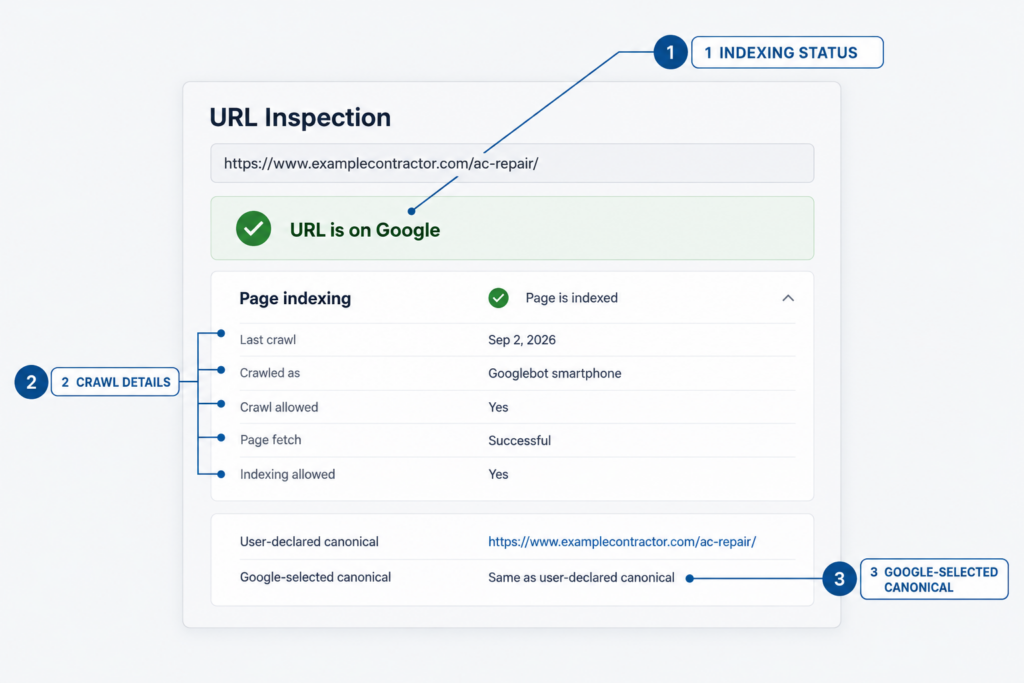
Inspect the homepage and each revenue-driving service page in Google Search Console. URL Inspection shows whether Google indexed the page, how it discovered and crawled the URL, and which canonical URL it selected. “URL is on Google” means the page is eligible to appear; it does not guarantee a ranking for your target query.
2. Check crawl and indexing controls
Confirm that the page returns a successful status, loads without a login, and is not blocked by robots.txt or a noindex directive. Check redirects and canonicals for accidental signals pointing elsewhere. Include important URLs in the XML sitemap and link to them from navigation, service hubs, locations, and relevant articles. A page Google cannot reach or is told not to index cannot compete.
3. Review recent website changes
Match the date of the visibility loss against a redesign, domain change, URL rewrite, platform migration, plugin update, or deleted page. Confirm that every important old URL redirects to its closest replacement and that internal links use the new URLs. Google notes that site moves can cause fluctuations while pages are recrawled, but missing redirects and conflicting canonicals can prolong the damage.
4. Verify the Google Business Profile
Check that the profile is verified, publicly visible, eligible under Google’s rules, and free of restrictions. Look for duplicate profiles. Confirm the real business name, phone, website, hours, primary category, secondary categories, services, address or service area, and customer-facing details. Do not add keywords to the business name unless they are part of the real-world name.
5. Test local relevance before chasing rank
A verified profile can still be a weak match for “emergency plumber near me” if its category, services, website, and local evidence do not support that query. Distance also matters, and you cannot optimize your way into being physically closer to every searcher. Strengthen the factors you can control: accurate details, clear service coverage, useful pages, authentic customer proof, and local authority.
Or have us do it for you: VIIRL SEO services for home service contractors
6. Inspect service and location pages
Each priority service needs a page that answers the homeowner’s actual questions: what you do, where you work, common problems, process, availability, price factors, credentials, warranties, proof, and the next step. Location pages should contain real local information. A city name swapped into the same paragraph 40 times gives Google more URLs, not more reasons to rank them.
We’re here to help: VIIRL website services and conversion strategy
7. Look for weak or competing pages
Several pages targeting the same service and city can split internal links and leave Google choosing between near-duplicates. Compare titles, headings, intent, and ranking queries in Search Console. Merge overlapping pages when they serve the same need. Upgrade thin pages with contractor-reviewed explanations, original photos, project evidence, decision criteria, and clear internal links.
8. Check authority and trust signals
Google’s local ranking guidance connects prominence with factors such as links and reviews. Audit major business listings for accurate information, then pursue legitimate local links from associations, manufacturers, suppliers, chambers, sponsorships, and earned media. Encourage honest customer feedback and respond professionally. The goal is consistent, verifiable proof of a real company doing real work.
9. Check manual actions and security issues
Review the Manual Actions and Security Issues reports in Search Console. Google’s Search Essentials explain that spam violations can reduce rankings or remove pages from results. If the site was hacked, injected with spam, or hit by a manual action, fix that problem before rewriting every service page.